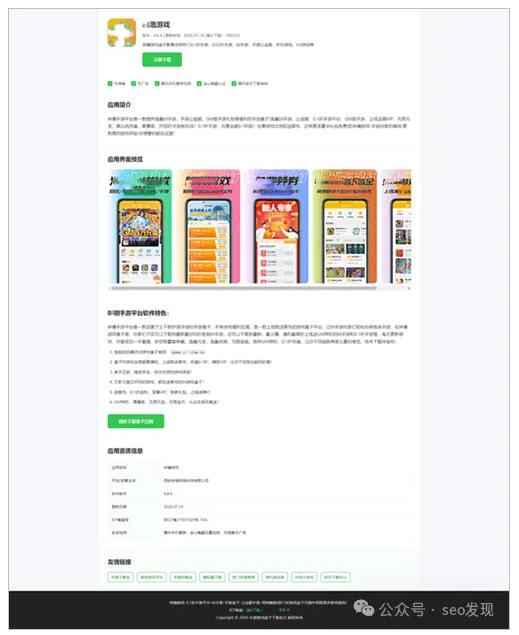


我一直喜欢玩单页,简单,方便,快捷!最近也在不停地大量做游戏下载站行业的各种单页,今天分享这个纯HTML的单页非常大气!适合入门的新手!我也是新手,不断实践,不断学习。
新手操作方法:
1、复制代码到本地电脑TXT记事本上,保存,重命名为:index.html 修改里面的文字和图片链接,我都标注好了!
2、解析二级域名到宝塔,创建纯静态站点,上传这个静态文件即可!
<!DOCTYPE html>
<html lang="zh-CN">
<head>
<meta charset="UTF-8">
<meta name="viewport" content="width=device-width, initial-scale=1.0, maximum-scale=1.0">
<title>网站标题</title>
<meta name="keywords" content="关键词">
<meta name="description" content="描述">
<style>
*{
    margin: 0;
    padding: 0;
    box-sizing: border-box;
    font-family: "Microsoft YaHei", system-ui, sans-serif;
}
body {
    background: #f5f7fa;
    color: #333;
    line-height: 1.7;
}
.main-wrap {
    max-width: 1200px;
    margin: 0 auto;
    background: #fff;
}

/* 头部信息区域 */
.app-header {
    display: flex;
    gap: 24px;
    padding: 34px 32px;
    align-items: flex-start;
    border-bottom: 1px solid #eee;
}
/* LOGO容器 自由替换图片 */
.logo-box {
    width: 106px;
    height: 106px;
    border-radius: 20px;
    overflow: hidden;
    flex-shrink: 0;
    background: #32c850;
}
.logo-box img {
    width: 100%;
    height: 100%;
    object-fit: cover;
    display: block;
}
.app-info h1 {
    font-size: 26px;
    font-weight: 600;
    margin-bottom: 8px;
}
.meta-text {
    font-size: 14px;
    color: #666;
    margin-bottom: 10px;
}
.short-desc {
    font-size: 15px;
    color: #444;
    margin-bottom: 16px;
}
.down-btn {
    display: inline-block;
    padding: 13px 42px;
    background: #32c850;
    color: #fff;
    text-decoration: none;
    border-radius: 8px;
    font-size: 16px;
    font-weight: bold;
    transition: background 0.2s;
}
.down-btn:hover {
    background: #27b041;
}

/* 签栏 */
.tag-row {
    display: flex;
    flex-wrap: wrap;
    gap: 22px;
    padding: 16px 32px;
    border-bottom: 1px solid #eee;
}
.tag-item {
    display: flex;
    align-items: center;
    gap: 6px;
    font-size: 14px;
    color: #555;
}
.tag-check {
    width: 18px;
    height: 18px;
    background: #32c850;
    color: #fff;
    text-align: center;
    border-radius: 4px;
    font-size: 12px;
    line-height: 18px;
}

/* 通用板块样式 */
.section {
    padding: 32px;
    border-bottom: 1px solid #eee;
}
.section-title {
    font-size: 22px;
    font-weight: 600;
    margin-bottom: 20px;
    color: #222;
}

/* 功能卡片 */
.feature-grid {
    display: grid;
    grid-template-columns: repeat(auto-fit, minmax(215px, 1fr));
    gap: 26px;
}
.feature-card {
    background: #f8fdfa;
    padding: 24px 16px;
    border-radius: 12px;
    text-align: center;
}
.feature-card h3 {
    font-size: 18px;
    color: #289b40;
    margin-bottom: 10px;
}
.feature-card p {
    font-size: 14px;
    color: #666;
}

/* 截图横向滚动区域(共5张独立图片,均可替换) */
.screenshot-scroll {
    overflow-x: auto;
    padding-bottom: 10px;
}
.screenshot-list {
    display: flex;
    gap: 16px;
    width: max-content;
}
.screenshot-item {
    width: 240px;
    height: 426px;
    border-radius: 12px;
    overflow: hidden;
    flex-shrink: 0;
}
.screenshot-item img {
    width: 100%;
    height: 100%;
    object-fit: cover;
    display: block;
}

/* 软件介绍 */
.step-list {
    padding-left: 24px;
    margin-top: 14px;
}
.step-list li {
    margin: 12px 0;
    font-size: 15px;
}
.step-list code {
    background: #eee;
    padding: 2px 7px;
    border-radius: 4px;
    font-family: monospace;
}

/* 应用表格 */
.info-table {
    width: 100%;
    border-collapse: collapse;
    margin-top: 18px;
}
.info-table td {
    border: 1px solid #eee;
    padding: 12px 14px;
    font-size: 14px;
}
.info-table td:first-child {
    width: 195px;
    background: #f8fdfa;
    font-weight: 500;
}

/* 友情链接模块 */
.link-section {
    padding: 32px;
    background: #f8fdfa;
    border-bottom: 1px solid #eee;
}
.link-wrap {
    display: flex;
    flex-wrap: wrap;
    gap: 14px;
    margin-top: 12px;
}
.link-wrap a {
    color: #289b40;
    text-decoration: none;
    padding: 6px 12px;
    border: 1px solid #289b40;
    border-radius: 6px;
    font-size: 14px;
}
.link-wrap a:hover {
    background: #289b40;
    color: #fff;
}

/* 页脚备案区域 */
footer {
    background: #222;
    color: #ccc;
    padding: 30px 20px;
    text-align: center;
}
footer a {
    color: #32c850;
    text-decoration: none;
}
footer a:hover {
    text-decoration: underline;
}
.footer-text {
    font-size: 14px;
    line-height: 2;
}

/* 移动端自适应 */
@media screen and (max-width:768px) {
    .app-header {
        flex-direction: column;
        text-align: center;
    }
    .logo-box {
        margin: 0 auto;
    }
    .feature-grid {
        grid-template-columns: 1fr 1fr;
    }
    .section, .link-section {
        padding: 22px 16px;
    }
}
@media screen and (max-width:480px) {
    .feature-grid {
        grid-template-columns: 1fr;
    }
    .info-table td:first-child {
        width: 130px;
    }
}
</style>
</head>
<body>
<div class="main-wrap">
    <!-- 头部LOGO,修改src替换图标 -->
    <div class="app-header">
        <div class="logo-box">
            <img src="填写LOGO地址" alt="LOGO">
        </div>
        <div class="app-info">
            <h1>名称</h1>
            <div class="meta-text">版本:0.0.1 | 更新时间:2026.07.14 | 累计下载:001次</div>
            <p class="short-desc">一句话描述</p>
            <a href="填写网址" rel="nofollow" target="_blank" class="down-btn">立即下载</a>
        </div>
    </div>

    <!-- 检测标签 -->
    <div class="tag-row">
        <div class="tag-item"><span class="tag-check">✓</span>文字</div>
        <div class="tag-item"><span class="tag-check">✓</span>文章</div>
        <div class="tag-item"><span class="tag-check">✓</span>文字</div>
        <div class="tag-item"><span class="tag-check">✓</span>文字</div>
        <div class="tag-item"><span class="tag-check">✓</span>文字</div>
    </div>

    <!-- 应用简介 -->
    <div class="section">
        <h2 class="section-title">应用简介</h2>
        <p>一句话介绍</p>
    </div>


    <!-- 界面预览(共5张截图,每张独立替换src) -->
    <div class="section">
        <h2 class="section-title">界面预览</h2>
        <div class="screenshot-scroll">
            <div class="screenshot-list">
                <!-- 第1张图 -->
                <div class="screenshot-item">
                    <img src="填写图片地址" alt="图片描述">
                </div>
                <!-- 第2张图 -->
                <div class="screenshot-item">
                    <img src="填写图片地址" alt="图片描述">
                </div>
                <!-- 第3张图 -->
                <div class="screenshot-item">
                    <img src="填写图片地址" alt="图片描述">
                </div>
                <!-- 第4张图 -->
                <div class="screenshot-item">
                    <img src="填写图片地址" alt="图片描述">
                </div>
                <!-- 第5张图 -->
                <div class="screenshot-item">
                    <img src="填写图片地址" alt="图片描述">
                </div>
            </div>
        </div>
    </div>

    <!-- 软件特色 -->
    <div class="section" id="install-guide">
        <h2 class="section-title">软件特色:</h2>
        <p>一句话介绍:</p>
        <ol class="step-list">
            <li>一句话介绍!:<code>可以填写网址</code></li>
            <li>一句话介绍!</li>
            <li>一句话介绍!</li>
            <li>一句话介绍!</li>
            <li>一句话介绍!</li>
            <li>一句话介绍!</li>
        </ol>
        <a href="网址" rel="nofollow" target="_blank" class="down-btn" style="margin-top:20px;">前往某某网站</a>
    </div>

    <!-- 应用信息 -->
    <div class="section">
        <h2 class="section-title">应用信息</h2>
        <table class="info-table">
            <tr>
                <td>应用名称</td>
                <td>软件名称</td>
            </tr>
            <tr>
                <td>开发/运营主体</td>
                <td>公司名称</td>
            </tr>
            <tr>
                <td>软件版本</td>
                <td>0.0.1</td>
            </tr>
            <tr>
                <td>更新日期</td>
                <td>2026.08.13</td>
            </tr>
            <tr>
                <td>ICP备案号</td>
                <td>备案号</td>
            </tr>
            <tr>
                <td>安全检测</td>
                <td>填写介绍</td>
            </tr>
        </table>
    </div>

    <!-- 友情链接模块 -->
    <div class="link-section">
        <h2 class="section-title">友情链接</h2>
        <div class="link-wrap">
            <a href="#" target="_blank">网站名称</a>
            <a href="#" target="_blank">网站名称</a>
            <a href="#" target="_blank">网站名称</a>
            <a href="#" target="_blank">网站名称</a>
            <a href="#" target="_blank">网站名称</a>
            <a href="#" target="_blank">网站名称</a>
            <a href="#" target="_blank">网站名称</a>
            <a href="#" target="_blank">网站名称</a>
        </div>
    </div>
</div>

<!-- 底部页脚 备案号可点击跳转工信部 -->
<footer>
    <div class="footer-text">
        <p>一句话介绍本页文字</p>
        <p>ICP备案:<a href="https://beian.miit.gov.cn/" rel="nofollow" target="_blank">填写你的网站备案号</a></p>
        <p>Copyright © 2026 填写你的网站名称 版权所有</p>
    </div>
</footer>
</body>
</html>
静态HTML下载效果如下: